Getting Started with Your DayZ Dedicated Server
DayZ is one of those games that's hard to explain to someone who hasn't played it. You spawn on a coast with nothing, and everything from there is up to you. The game started as an Arma 2 mod by Dean Hall, eventually became its own standalone title under Bohemia Interactive, and the core loop hasn't really changed: scavenge, survive, don't trust anyone. The default map, Chernarus, is about 225 km² of post-Soviet countryside, and the default player cap is 60, though you can raise it if your server can handle it.
Running your own server means you get to decide how the whole thing works. Loot rates, mods, who's allowed in, what map you're playing on. This guide covers how to get a DayZ server set up with LOW.MS and how to connect to it.
Why Bother Hosting Your Own Server?
If you've only played on public servers, hosting your own might sound like a lot of work. Honestly, the initial setup is pretty straightforward, and the payoff is worth it:
- You make the rules. Player limits, whitelist, BattlEye, passwords. It's your call.
- You control the loot economy. The types.xml file lets you tweak spawn rates for every single item in the game. Want more M4s? Fewer cans of beans? You can do that.
- Mods. DayZ has a large and active modding community. Traders, helicopters, expanded base building, new maps, you name it. Steam Workshop makes installing them fairly painless.
- It's always on. Your server runs 24/7. Bases stay built, gear stays stashed, the world keeps ticking whether you're online or not.
- Better performance. Dedicated hardware means less lag and no host advantage. In a game where a half-second delay can get you killed, that matters.
- Community. Some of the best DayZ experiences I've seen are community-run servers with their own identity and regular players.
Step 1: Order Your DayZ Server
Head over to the DayZ server hosting page on LOW.MS and pick a plan that suits what you're after. DayZ is notoriously RAM-hungry, especially once you start adding mods, so keep that in mind when choosing.
You can also add the Dedicated IP option at checkout. It puts your server on DayZ's default port, 2302, when that port is free on the machine your server lands on, which makes the address easier for players to remember. If 2302 is already taken there, your server gets a different port and our team is alerted.
Once you've ordered, the server gets provisioned automatically. You'll get your details by email and in the control panel.
Step 2: Access Your Control Panel
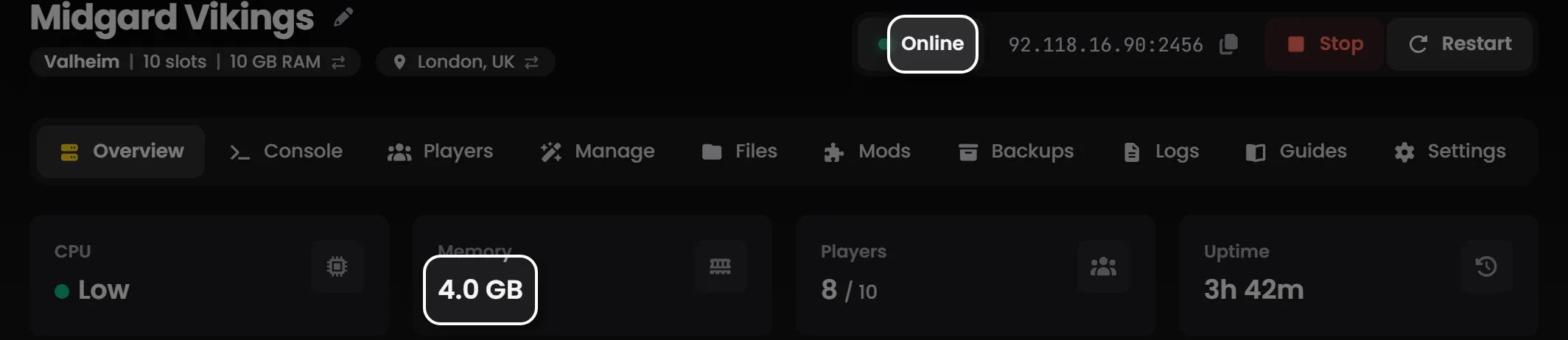
Log in to the control panel to manage your server. From here you can:
- Start, stop and restart the server from the top of its page
- Keep an eye on CPU, memory and player count on the Overview tab
- Watch the console in real time on the Console tab
- Change server settings on the Manage tab, and edit files like
types.xmlon the Files tab - Install Workshop mods from the Mods tab
- Create and restore backups on the Backups tab
- Schedule automatic restarts and backups with Add schedule on the Settings tab
Step 3: Configure Your Server Settings
Your server ships with sensible defaults, but you'll probably want to tweak a few things. The main config file is serverDZ.cfg. On LOW.MS you don't edit it directly: its main settings are fields on the Manage tab, and the control panel writes the file from them on every start.
The Important Settings
| Setting | Default | What it does |
|---|---|---|
hostname |
Your server name | What shows up in the server browser |
password |
(empty) | Set one to make the server private |
passwordAdmin |
(generated) | Your in-game admin password (#login) |
maxPlayers |
60 | The default is 60 but you can raise it |
verifySignatures |
2 | Signature verification. Keep this at 2 |
forceSameBuild |
1 | Makes sure everyone's on the same game version |
disable3rdPerson |
0 | Set to 1 for first-person only |
disableCrosshair |
0 | Set to 1 to remove the crosshair |
serverTime |
"SystemTime" | Or set a fixed time like "2025/6/15/12/00" for permanent daytime |
serverTimeAcceleration |
12 | How fast time passes. 1 is real-time, max is 24 |
serverNightTimeAcceleration |
1 | Night speed multiplier relative to daytime (this one goes up to 64) |
serverTimePersistent |
0 | Set to 1 to keep the time between restarts |
BattlEye |
1 | Anti-cheat. Leave this on |
enableWhitelist |
0 | Set to 1 if you want a Steam ID whitelist |
Making It Private
If you want a password-protected server, just set this in serverDZ.cfg:
password = "YourSecurePassword";
Players will need to enter it when they connect. On LOW.MS, put it in the Server Password field on the Manage tab instead.
BattlEye
BattlEye is DayZ's anti-cheat and it's on by default. I'd recommend keeping it that way. Turning it off means your server won't show up in the default server browser for most players, and you'll be wide open to cheaters.
Step 4: Connect to Your Server
Once the server is running:
- Launch DayZ on Steam
- Click Servers from the main menu
- Go to the Favourites tab
- Click Direct Connect (bottom-right)
- Enter your server's address and port, shown at the top of your server's page in the control panel
- Type the password if you set one
- Hit Connect
You can also search for your server by name in the Community tab and right-click it to add it to Favourites.
DZSA Launcher
A lot of players use the third-party DZSA Launcher, especially for modded servers. It handles mod downloads automatically and makes managing multiple servers a lot easier. You can find your server there by name or IP.
Step 5: Set Up Admin Access
You'll want admin access for kicking players, banning troublemakers, and restarting the server in-game.
- Copy the Admin Password from the Admin group on the Manage tab
- In-game, press your chat key and type:
#login YourAdminPassword - Once logged in, you've got access to commands like:
#shutdownto gracefully stop the server#restartto restart it#kick PlayerNameto kick someone#ban PlayerNameto ban them
Step 6: Invite Your Friends
Share these details with anyone you want on the server:
- Server name (the
hostnamevalue) - The address and port from the top of your server's page in the control panel
- Password, if you set one
- A list of any required mods so they can subscribe on the Workshop before joining
They can add the server to Favourites in the DayZ browser or DZSA Launcher for easy access later.
Maps and DLC
DayZ has a few map options beyond the default:
- Chernarus is the classic. ~225 km² of post-Soviet countryside. Included with the base game and still the most popular map by far.
- Livonia is a denser, more forested 163 km² map with bears and a different feel. It's been free since update 1.25 (May 2024), so no extra purchase needed.
- Sakhal is a harsh, snowy island. Requires the Frostline DLC.
- Nasdara came with the paid Badlands DLC on 15 October 2026. Its mission folder is
dayzOffline.nasdara. - Community maps like Deer Isle, Namalsk, Esseker, and Banov are available through the Steam Workshop and offer completely different vibes.
To switch maps, set the Mission field on the Manage tab. Our map switching guide covers how.
What's Next
Now that your server's running, you'll probably want to get into the weeds with configuration:
- DayZ Server Configuration Guide for serverDZ.cfg details, types.xml loot tuning, mods, and advanced settings
- DayZ Troubleshooting Guide if something's not working right
If you get stuck, open a ticket from the control panel and we'll help.