Adding a admin to Ark is super straight forward, all you will need to get is the Steam ID 64 of the person you are adding. These steps are written for our ARK: Survival Evolved servers, and the same file works on any host.
Follow these steps to set this up:
- Log in to the control panel at https://control.low.ms
- Click "File Manager"
- Navigate to /ShooterGame/Saved
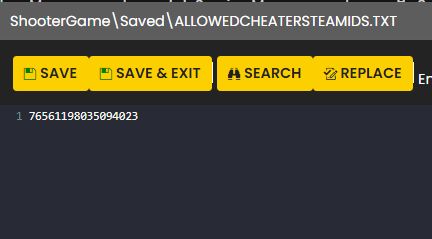
- Click "New File" and name it "AllowedCheaterSteamIDs.txt"
- Edit the new file you just created
- Add the 64 bit Steam ID's for each Admin, one per line. You can get your 64-bit Steam ID from http://steamid.io
- Save and restart your server.